FurryByte

UX Case Study
FurryByte project imageFurryByte project image
role
Solo UX Designer
client
Google UX Design course
project duration
2 months
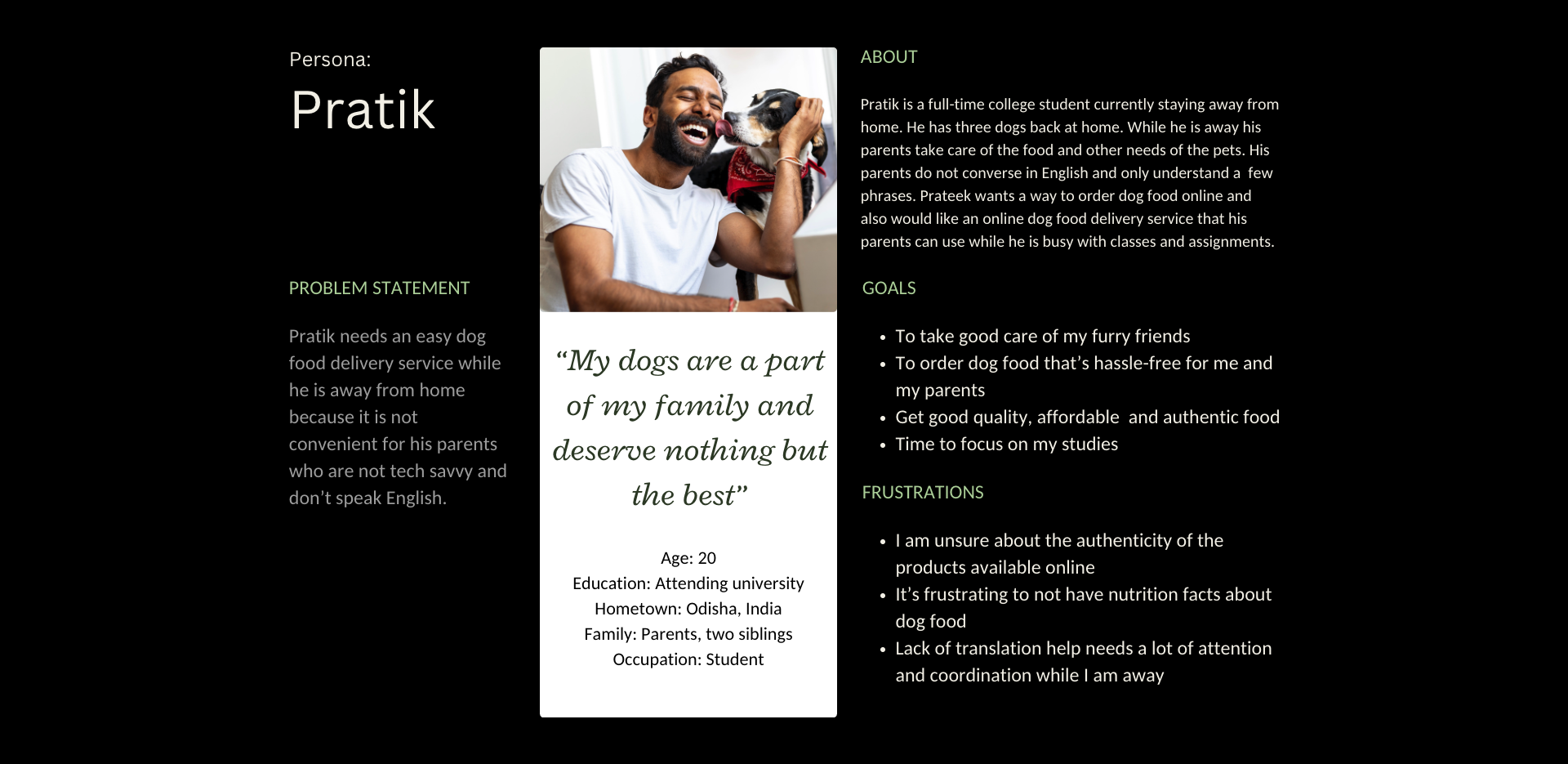
"My dogs are a part of my family and deserve nothing but the best."
- Test participant

Introduction

FurryByte is the personal food planner for your furry friend. My top priority while designing FurryByte was the dog's health and users' needs. In doing so I had to think about the current issues dog parent's face and offer a perfectly balanced meal plan with the least amount of planning.
Understanding the problem

My preliminary research showed that most websites online follow a traditional approach to selling dog food. In other words, typically, a dog parent or shopper:

  • browses a website
  • searches for a specific product or a category
  • evaluates their choices
  • makes a selection
  • and finally makes a purchase

The primary user group (i.e. dog parents) confirmed initial assumptions, but research also revealed that users not only have challenges purchasing dog food online but cannot always find what they are looking for. Additionally, dog parents prefer to buy food in bulk from a physical store to avail profits.

Conducting research

I conducted five interviews with people in my network to obtain in-depth qualitative responses regarding the challenges of ordering dog food online. In the recruitment, I included people of different age groups and preferences.

Findings from interviews

Interview insight #1

Meal planning is cumbersome

"I cook rice, boil some chicken and sneak in a few vegetables, it works most of the time but sometimes my dog (Tyson) is just too smart, and beats me to the punch."
Users find it difficult to plan meals for their dogs so they purchase what is readily available in the market. Pets are an integral part of the family and some pet owners prepare meals for their pets at home but find it time consuming and cumbersome, and are worried that their pets are not getting complete nutrition.
Interview insight #2

Pet food is expensive

Interviewing pet owners uncovered that not everyone shops for pet food online. 3 out of 5 participants said that they go to a physical store to buy food in bulk and to get discounts on their bulk orders. Majority users would like to save without compromising on the quality.
Interview insight #3

Inaccessible platforms

Platforms for ordering dog food are not always equipped with assistive technologies like translation help, images, authenticity, nutritional goals, and more.
Interview insight #4

Concerns about pet health

Pet owners are unsure about feeding the right kinds of food when their dog is diagnosed with a condition such as over/under weight conditions, food allergies, skin diseases and gut related issues.

building user personas

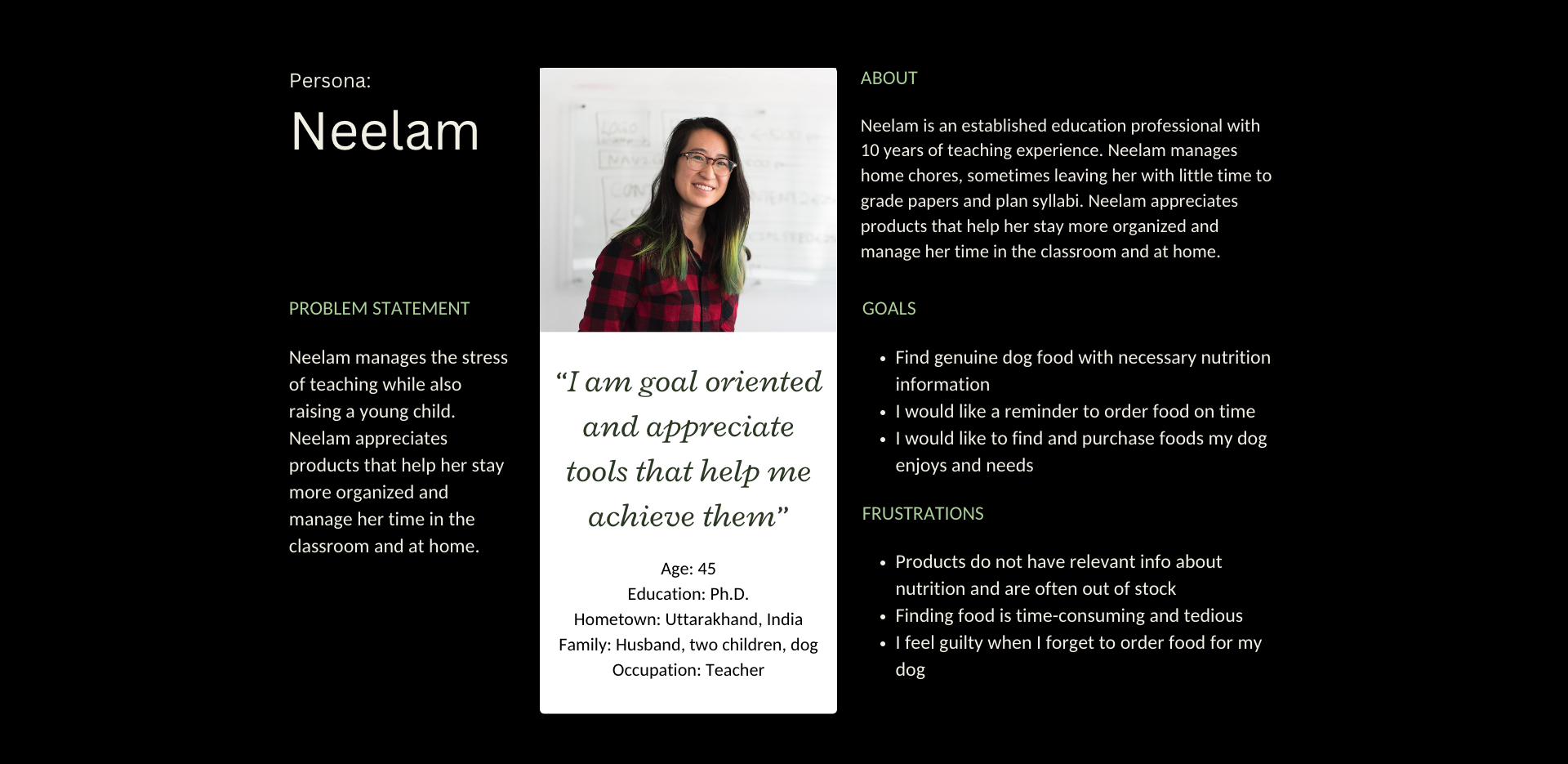
To truly connect with my users, empathize with them, meet their needs or challenges and provide the best experience when using FurryByte, I developed two user personas.

User persona of dog food buyers

building user journey map

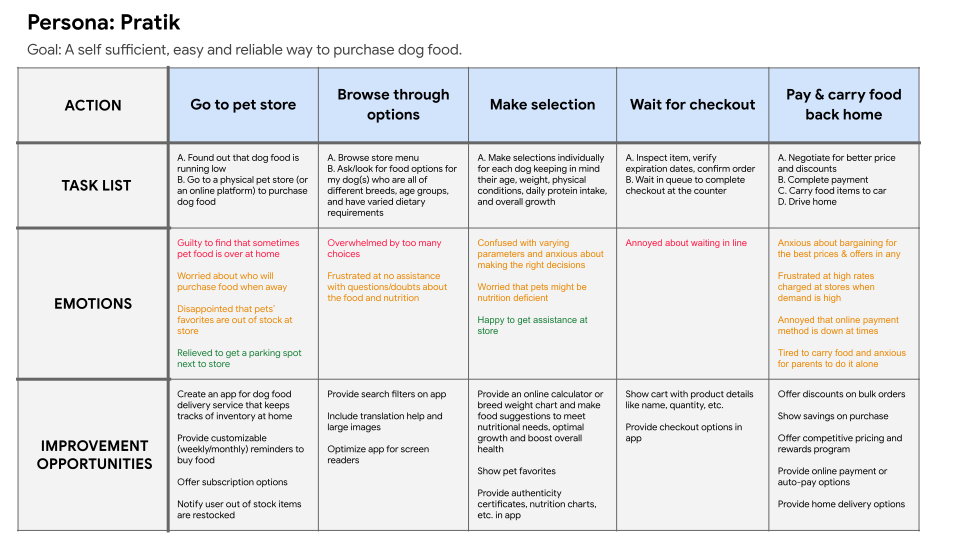
The user journey map helped me step into my users' shoes and truly think and feel like them. It gave me valuable insight into how my personas would approach buying dog food online or at a physical store.

User journey map for buying dog food

conducting competitive analysis

I chose Amazon, Supertails, Pawfectly Made, and Blinkit for my competitive analysis.

Analyzing the brands and products of competitors who offer similar products as FurryByte, gave me a well-rounded foundation of knowledge about the market. I carried that knowledge into my designs and created a helpful and unique prototype for users.

Ideating design solutions

brainstorming design ideas

The main goal of FurryByte was to provide the best dog food recommendations without dog parents having to do any planning and prepping. I analyzed the user journey map, competitors' strength and weaknesses, and evaluated the gaps and opportunites and asked myself:

How might we make the food selection process less stressful for customers?
How might we celebrate the user’s effort after they have placed an order?
How might we make the selection process an emotional experience?
How might we make the app make the best possible recommendation?

outlining user flow

In order to visualize the steps that the user would take to buy dog food online and to keep them engaged in the product, I created the following user flow. My primary goal for my user was to use the FurryByte app to place a delivery order for dog food quickly and easily.

User flow diagram for FurryByte

Building wireframes and prototypes

storyboard

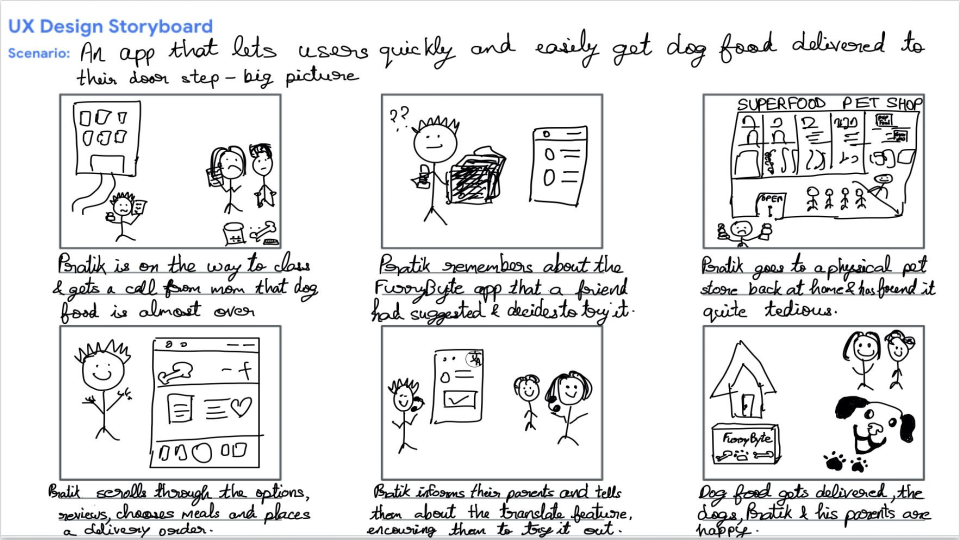
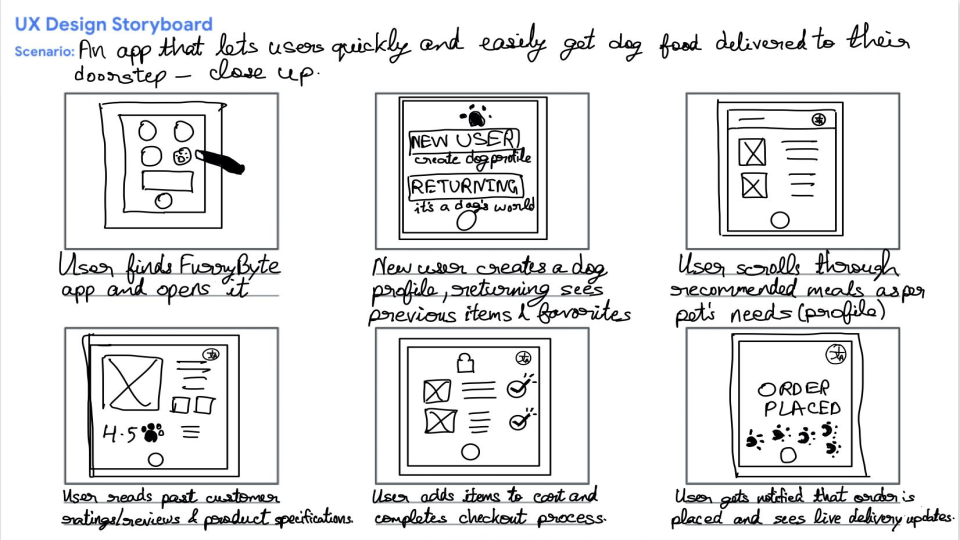
I took the steps I created from the user flow and had a lot of fun storyboarding my user needs, their context and ways FurryByte would be useful.
Big picture storyboard of FurryByte
Close up storyboard of FurryByte

Information Architecture

Now that I had the all the essentials pieces from my user research, competitive analysis and ideating initial design solutions, I needed to clearly organize and sort them so that my users could have the best solution possible. I created the information architecture of my product keeping three key elements in my mind, organization, hierarchy and sequence.

FurryByte's sitemap

paper wireframes

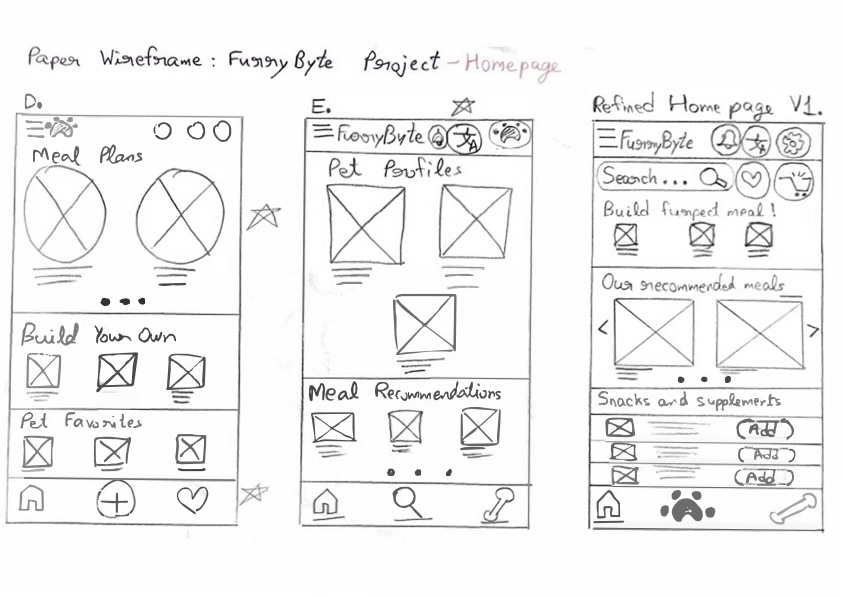
Creating the paper wireframes helped me quickly organize my ideas and add important elements that would address user pain points. It encouraged me to lay out a clear workflow and prioritize an easy way to build a meal or order recommended meals.

Paper wireframe of FurryByte

Low-fidelity Prototype

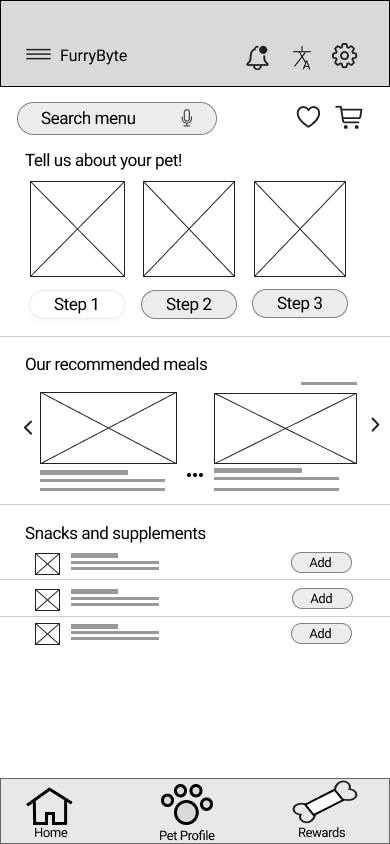
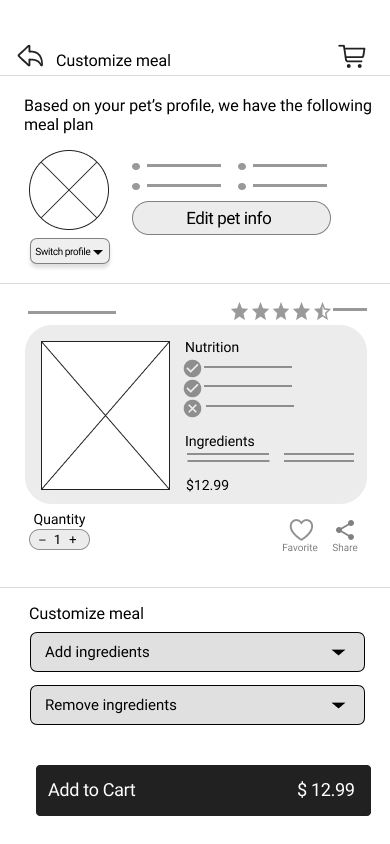
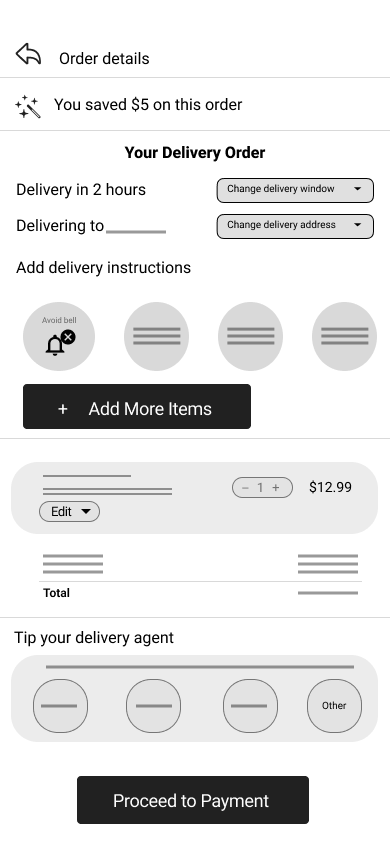
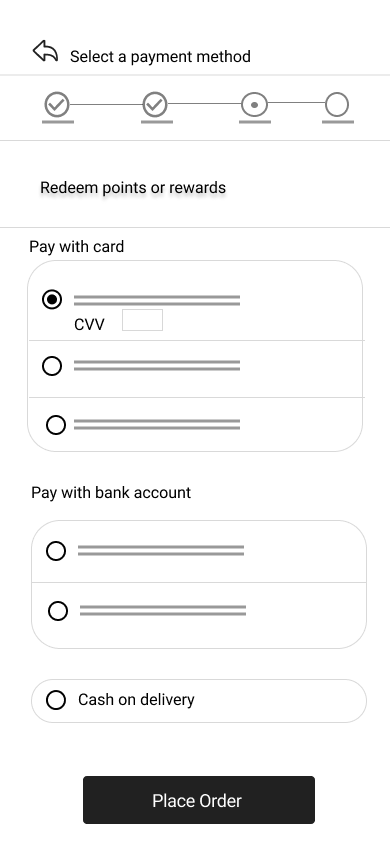
During the initial design phase, I focused on the main user pain points based on feedback and findings from user research. I created the low-fidelity prototype so that I could test it with my study participants in the usability study and make the necessary adjustments to meet my user's needs.

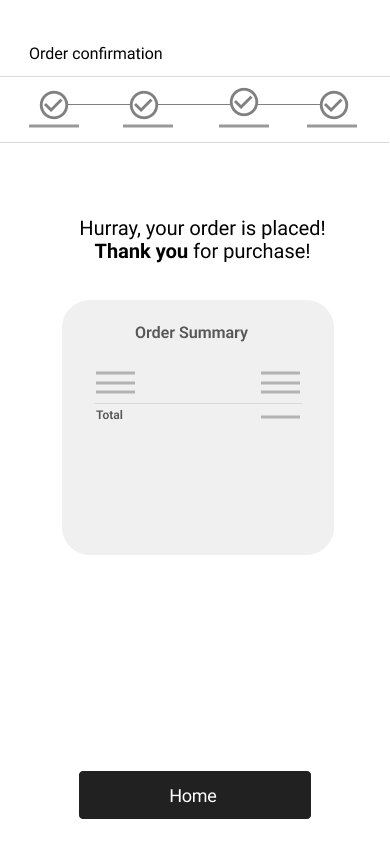
Low fidelity UI of homepageLow fidelity UI of customize mealLow fidelity UI of order detailsLow fidelity UI of checkout pageLow fidelity UI of order confirmation page

Collecting Insights from usability study

I conducted a moderated usability study and gathered early feedback. The usability study allowed me to dig into the details and ask follow-up questions throughout the session to learn more about best possible user experience for FurryByte customers.
Interview insight #1

Confusion around pet profile

Having the steps to enter pet information and recommended food on a single page led to confusion. Participants were happy to see food recommendations but were not sure what the recommendations were based on.
"I am not sure how the meal plan is recommended to me... is it because of the info provided about my pet or is it any general info."
Interview insight #2

Food customized for pet's optimum health

Users appreciated the recommended meals section but were concerned if the recommendations met the needs of their pet when they are diagnosed with a condition e.g. skin allergy.
"Sometimes I worry about feeding the wrong things to my dog, I would like that the app to let me know dos and don'ts."
Interview insight #3

Concise information

Users found an overwhelming amount of information on a few pages.
"Woah, there is a lot going on here, some screens have high information density, it may be overwhelming for people who are using the product."
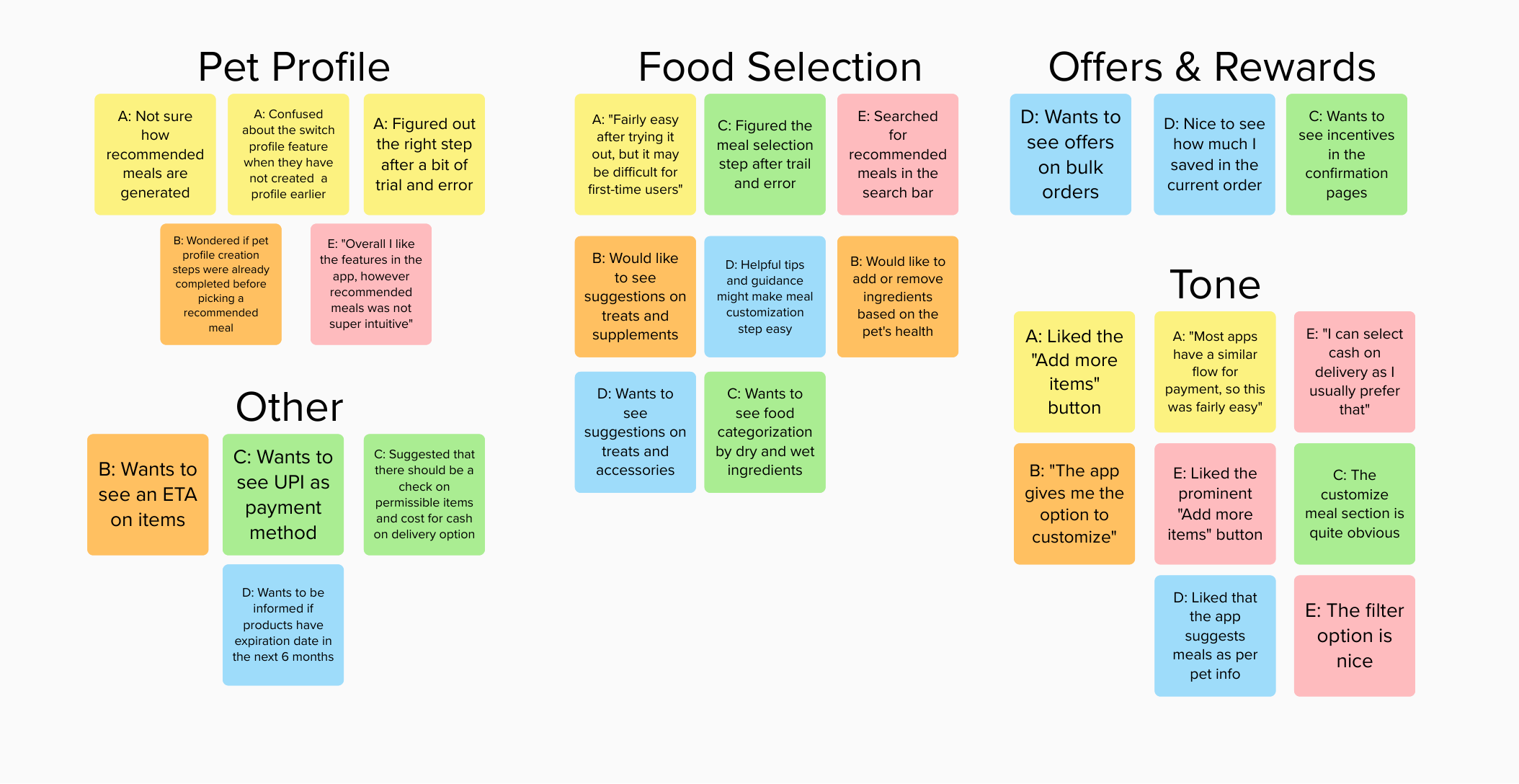
Some insights were out of scope of the initial product design and planning phase, nonetheless I wanted to gather them for future implementations. I grouped these insights under common themes and features with the help of a affinity mapping diagram.
Screenshot of affinity diagram

Designing the style guide

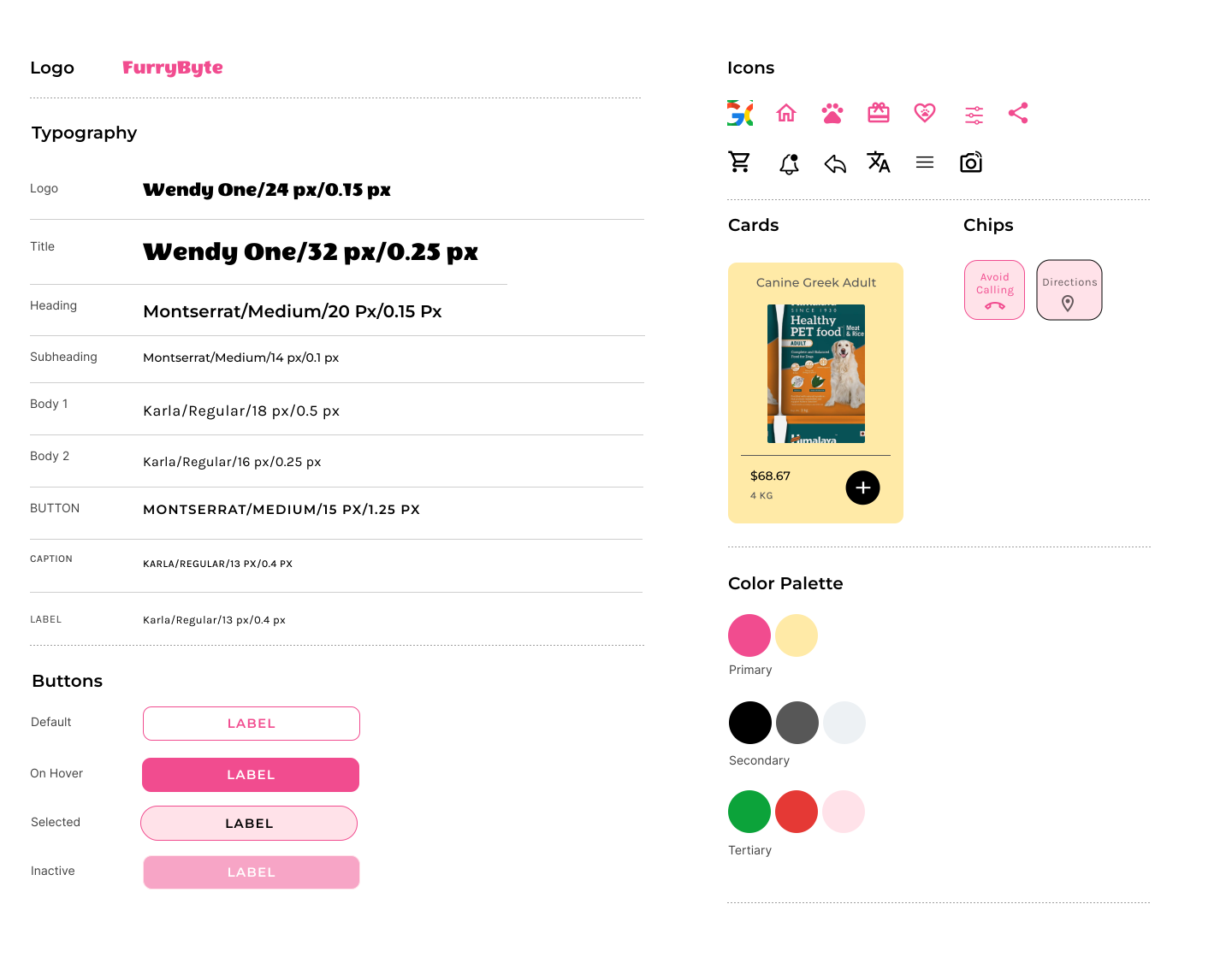
Dogs are our best friends and their cheerful nature fill our lives with love and happiness. Not long ago, I read Leatrice Eiseman's Color Harmony and was fascinated by the impact and emotions colors have in our lives . According to the author, the color yellow is thought of as friendly, forthcoming, energizing and enriching. Pink symbolizes, love, compassion, gentleness and playfulness. I wanted to carry these emotions into my app and with a lot of iterations, I created my style guide.

Screenshot of FurryByte's style guide

High-Fidelity Prototype

For this challenge, I created an end-to-end flow starting from the user login to ordering dog food. The high-fidelity design that I used for my usability testing addressed the essential user needs i.e.

  • creating a dog profile with all the information required to develop a meal plan
  • browsing through food recommendations
  • adding to cart and placing an order

1. Pet Onboarding

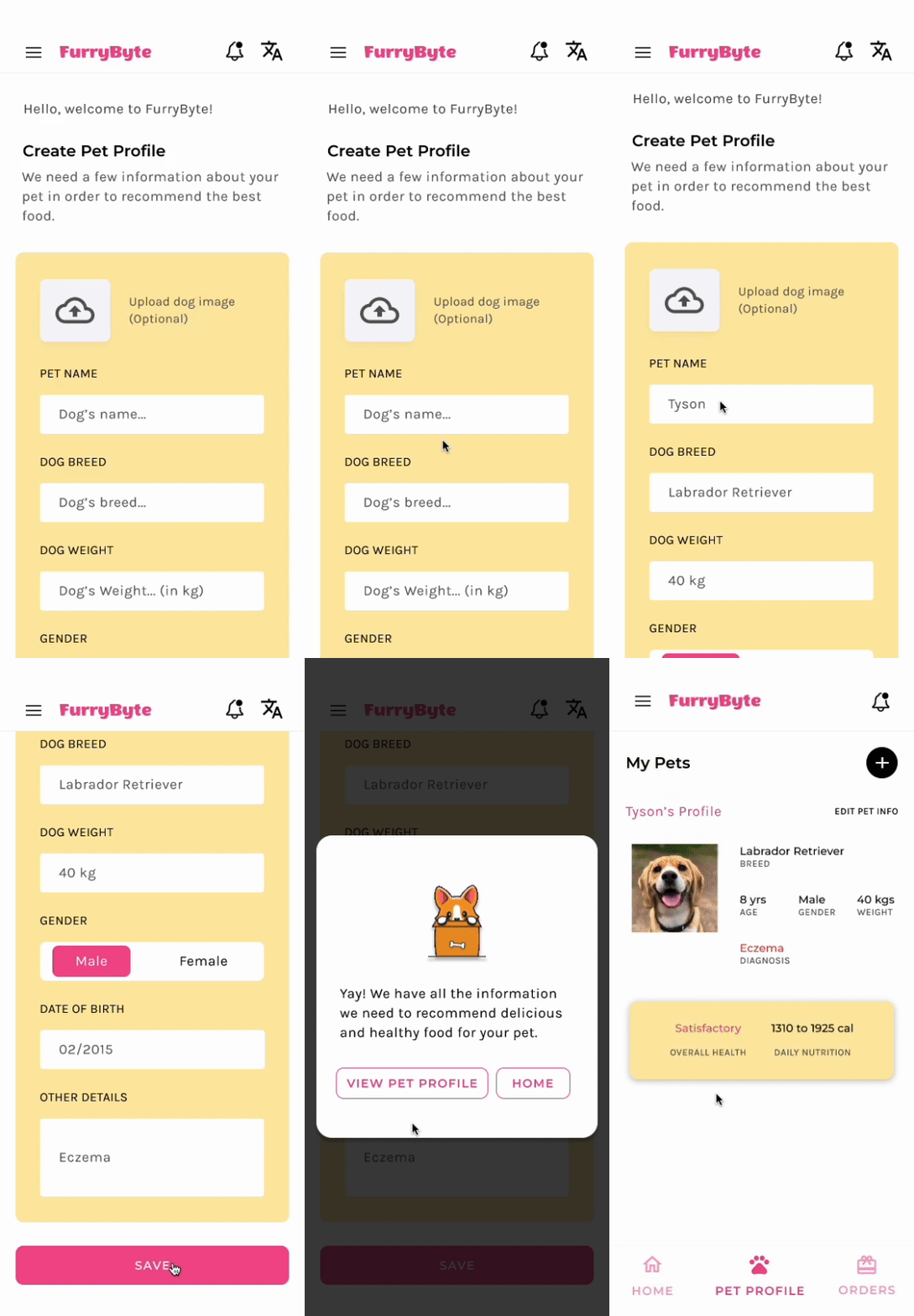
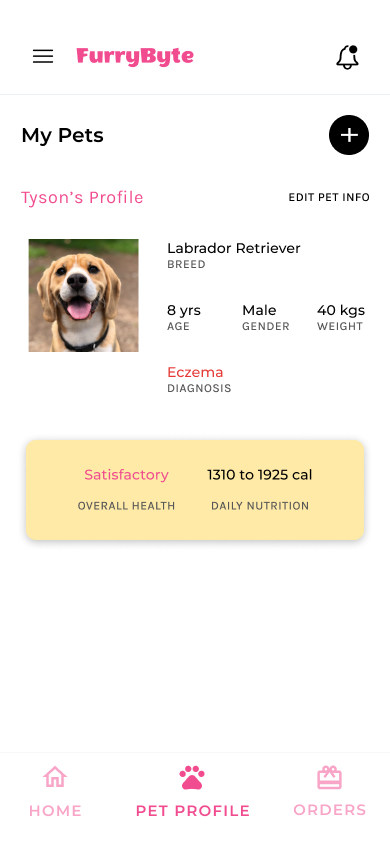
Having the onboarding information and food recommendations on a single screen in the low fidelity prototype was confusing to test participants. Creating an onboarding step made more sense, hence I created a dedicated onboarding page for users to provide their pet details.
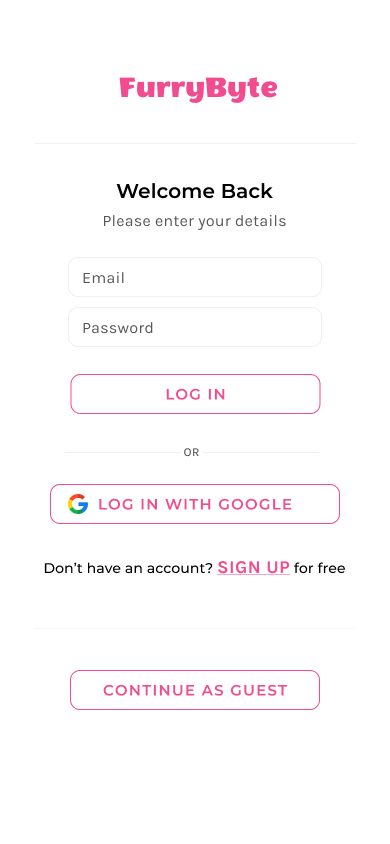
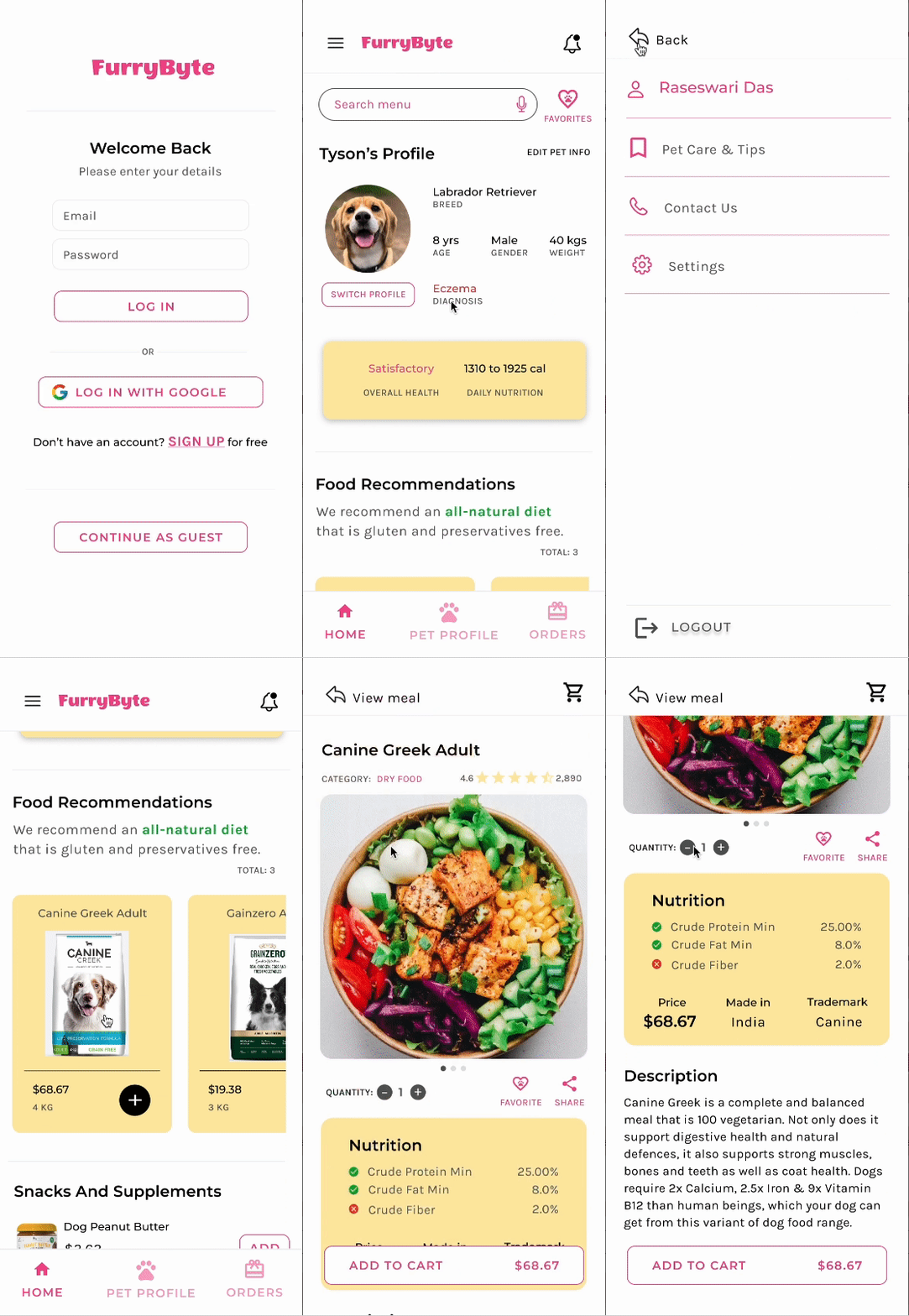
Mobile login UI
GIF of dog profile creation
Pet profile UI

2. Food Selection

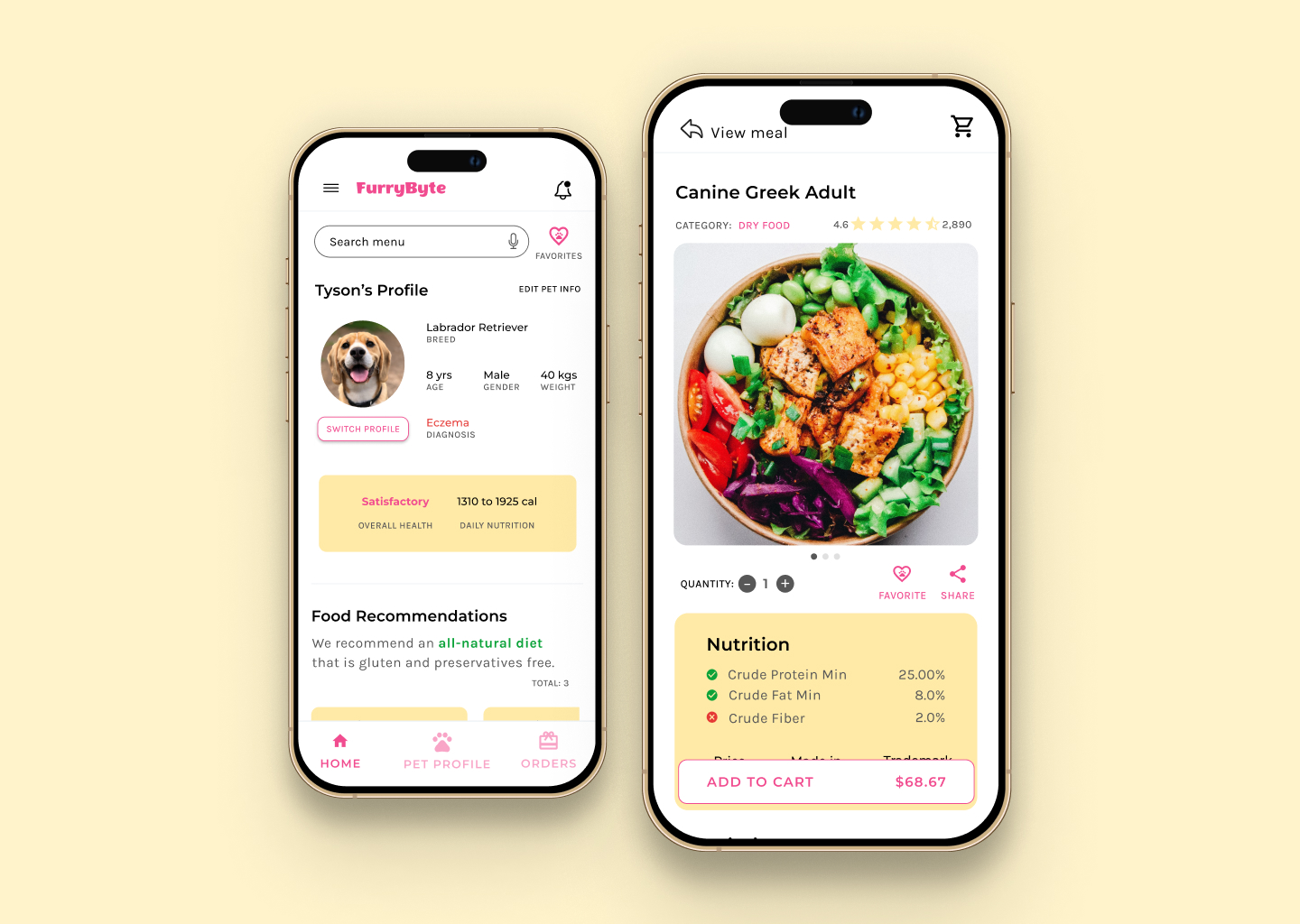
Food recommendations are made based on nutritional facts for the pet’s optimum health. The heart icon is a shortcut to past orders and would show user favorites.
Users wanted to take out the guesswork out of meal planning. I added a breakdown of the nutritional information for every product, so that customers can order with confidence.
GIF of FurryByte's app usage

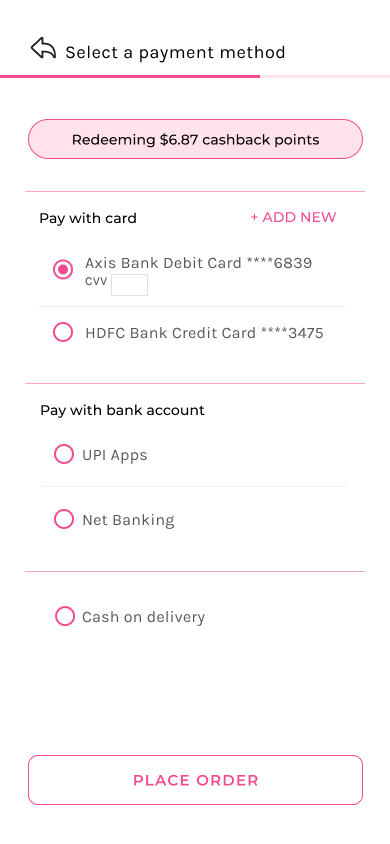
3. Placing an order

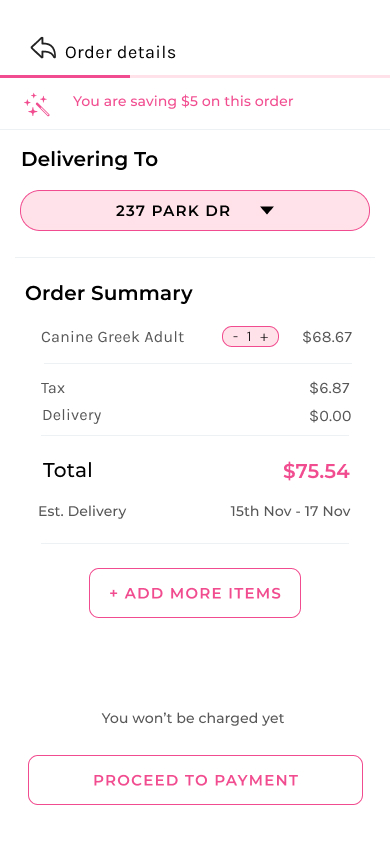
Users needed better cues to add address on the checkout page. I reorganized the information and removed unnecessary details so that users are presented with bite-sized info at a time.
An order details page
A payment page
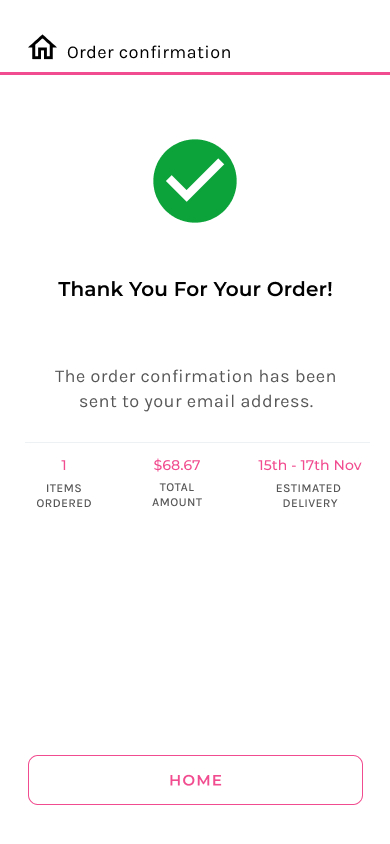
Order confirmation page

My learnings and takeaways

I created this project as a part of the Google UX Design Professional Certificate course and gave it my best. Throughout this experience, I have gained valuable knowledge and skills in user-centered design and research. If I had more time, I would have loved to add the translation feature to my application for non native English speakers.

Importance of Accessibility

I learned about the importance of accessible design, followed the WCAG (Web Content Accessibility Guidelines) such as text readability, alt-text and contrast to improve accessibility for people with disabilities. I avoided color combinations that are hard to distinguish and used high contrast, ensured hierarchy, legibility, and reasonable speed of animations.

My network is my greatest asset

During the early days of my UX design transition, I took everything as a solo challenge and spent countless hours on refining my designs and polishing my skills. While it did teach me a lot, it sometimes was time consuming and tedious. On networking with other design folks and mentors, I learnt that design need not happen alone and great designs and experiences are seldom the outcome of one single person. They recommended reaching out to friends, family, product managers and anyone who is willing to spare some time. I was amused to see that not only they were willing to help but also eager to provide great feedback.

Design systems are my new best friend

I learned that with a design system, I can not only keep my designs organized but also save myself from countless hours of rework. Now, whenever I work on my designs, I first ask myself how to keep things consistent, organized, scalable, are my designs reusable and if a clear message is carried throughout my designs.

Other projects

Get in touch

dasraseswari@gmail.com